
Google Ads
Google LLCBusiness
4.13.48K Reviews
- Version
- Varies With Device
- Installs
- 10.00M
- Age Rating
- Everyone
Screenshots
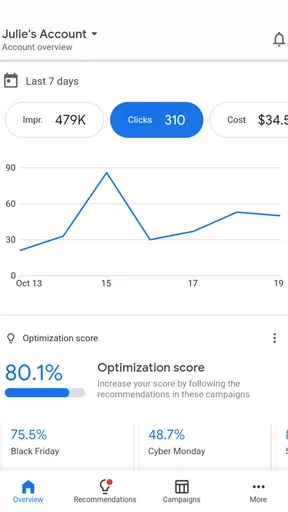
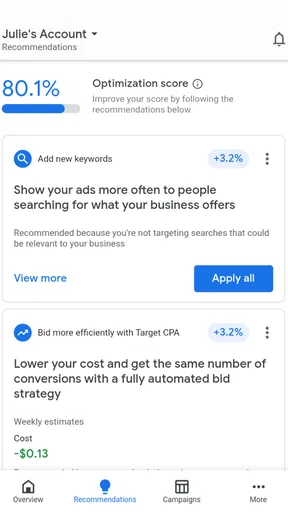
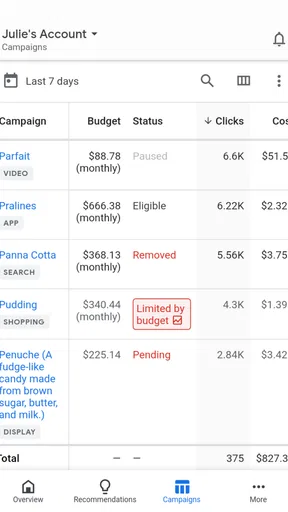
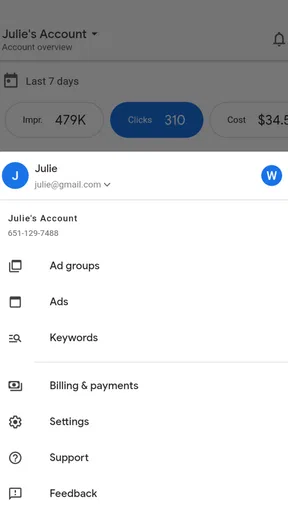
Our Review of Google Ads
 Analysis by Appyee
I find Google Ads most useful when I treat it as a mobile control panel rather than a complete replacement for the desktop advertising workspace. When a campaign is already running and I need to understand what is happening before making a decision, the app gives me a practical way to stay close to the account. It is a free business app from Google LLC, available to everyone, and its focus is straightforward: keeping an eye on advertising activity while I am away from my computer.
That distinction matters. I would not choose it as my only tool for building a complicated advertising strategy from scratch, but I would happily keep it on my phone if paid search were part of my daily work. Its value appears in the moments between meetings, during a commute, or when a client asks whether a campaign is spending normally. Instead of opening a laptop just to inspect the basics, I can use the smaller interface to get oriented and decide whether deeper work is necessary.
From a running campaign to a useful decision
When I check a running campaign away from my desk, I try to turn a quick glance into a clear next step rather than an impulsive edit. That distinction becomes even more important when a phone or tablet is shared at home: convenience should not blur whose account is open or who is responsible for acting. I’d start by making those boundaries clear, then consider how to pass useful observations to anyone else involved.
The starting condition: what I need before opening the app
The best experience begins with a clear question. I might want to know whether a campaign is active, whether recent performance looks unusual, or whether an account needs attention. That is a better starting point than opening the app with the vague hope of discovering a complete marketing plan. Mobile advertising tools are strongest when they help answer a focused question quickly, and this one fits that pattern.
I also need the account structure to be reasonably understandable. If several campaigns serve different products, locations, or audiences, I get more value from checking one area at a time. A messy account remains messy on a phone. The app can bring the information closer, but it cannot replace sensible naming, consistent organization, or an agreed process for deciding what deserves action.
For a small business owner, the starting condition may be simpler. Perhaps a local service campaign is already live and the owner wants to check activity after a busy day. For an agency, the same screen may be used as a quick triage tool across client accounts. In both cases, the app is more useful for monitoring and response than for replacing thoughtful planning.
Step one: orient myself before touching anything
When I open the app, I first try to understand the overall state instead of immediately changing a setting. That habit prevents a common mobile mistake: reacting to one visible number without considering the campaign’s broader context. I look at which account or campaign I am viewing, what period the figures represent, and whether the result seems consistent with the question I started with.
This is one of the app’s quiet strengths. A phone is always nearby, so checking becomes easier to fit into a normal workday. I can use a short pause to decide whether something deserves a proper desktop review. That saves time without encouraging me to pretend that a quick glance is the same as analysis.
The trade-off is screen space. On a desktop, I can compare several dimensions at once and keep more context visible. On a phone, I have to move through the interface more deliberately. I recommend slowing down whenever a decision could affect spending or a client’s expectations. A fast screen is useful for orientation; it is not automatically sufficient evidence for a major change.
Step two: move from signals to a working hypothesis
After the first glance, I try to form a simple hypothesis. Maybe performance has softened, perhaps activity is normal, or a campaign needs investigation because the recent picture does not match expectations. The app helps me stay connected to those signals, but the quality of my conclusion still depends on knowing the campaign’s objective and normal operating pattern.
A useful workflow is to compare what I see with a question written in plain language: “Is this campaign behaving as expected today?” That is more practical than trying to interpret every available detail on a small display. If the answer seems uncertain, I mark the issue for deeper review instead of making a rushed adjustment.
This is also where I see a meaningful difference between this app and a generic analytics dashboard. A general reporting tool may be better for combining advertising with sales, website behavior, or customer records. Google’s mobile app is more directly tied to the advertising account itself, so it makes sense when the immediate concern is campaign oversight rather than a complete business report.
Step three: decide whether the issue is urgent
Not every unusual result deserves an immediate intervention. A campaign can look different because of timing, demand, competition, or a change elsewhere in the customer journey. From the phone, I use the available view to separate “I should investigate this” from “I must act right now.” That distinction is especially important for anyone managing several accounts at once.
My preferred rule is simple: use the app to identify a possible problem, then confirm the reason before making a consequential change. If the situation is obvious and the action is routine, mobile access can be convenient. If the situation involves a large budget, a complex account structure, or an unclear cause, I move the work to a larger screen.
This approach gives the app a realistic role in a professional workflow. It is not trying to be a full marketing education course in my pocket. It is a way to reduce the delay between noticing something and deciding what should happen next.
Step four: make the smallest sensible intervention
When I do act from the phone, I prefer a narrow change with a clear reason. The smaller interface makes restraint valuable. I do not want to make several unrelated adjustments simply because I am already inside the account. One deliberate action is easier to explain, review, and undo than a cluster of hurried edits.
This is a particularly useful habit for a business owner who manages advertising personally. The app can make the account feel accessible, but accessibility should not turn into constant tinkering. A campaign needs enough stability for its results to be interpreted. If I change too many things during a quick check, I make the next review harder rather than easier.
For agency work, I would also record the reason for an important action outside the app’s immediate view, using the team’s normal notes or communication process. Mobile access speeds up the operational step, but it does not automatically create a shared history for colleagues. That is one of the first handoffs to plan carefully.
The handoff from mobile monitoring to desktop analysis
The most realistic workflow is not phone versus computer; it is phone first, computer when needed. I use the mobile app to spot a question, then hand that question to a fuller analysis process. On a desktop, I have more room to compare campaigns, inspect the account structure, review broader context, and discuss the implications with a colleague or client.
This handoff is where expectations matter. If I tell a teammate only that “the campaign looks bad,” I have not passed along enough information. A useful handoff includes the campaign involved, the period I checked, the specific signal that caught my attention, and what I want confirmed. The app makes the first observation easier, but I still have to communicate it clearly.
For a solo advertiser, the handoff may simply be a note to myself: what looked unusual, when I noticed it, and what I plan to inspect later. That small discipline prevents a common problem with mobile tools—seeing something important while distracted, then forgetting the details before reaching a computer.
The handoff to clients, owners, or other decision-makers
Advertising work often involves people who do not use the account directly. A manager may ask whether spending is under control, a client may want a quick update, or a sales team may need to know whether a promotion is active. In those cases, I would use the app to prepare a concise answer, not to overwhelm someone with isolated metrics.
A good update connects the observation to the business question. Instead of repeating a figure without context, I would explain whether the campaign appears to be operating normally, whether I am investigating a concern, or whether a larger review is needed. The phone helps me respond promptly, but judgment still determines whether the response is useful.
This is also a reason not to hand the app to every stakeholder as if access alone solves collaboration. Someone who needs performance summaries may be better served by an agreed reporting routine. Someone responsible for campaign changes may benefit from the mobile app. Those are different needs, and confusing them can create unnecessary edits or unclear accountability.
Turning the check into an outcome
The outcome I want is not merely having opened the app. It is a decision with a next step: leave the campaign alone, investigate it on desktop, discuss it with the team, or make a limited operational change. That makes the mobile check worthwhile even when nothing is changed.
In a realistic everyday scenario, imagine that I run advertising for a small repair business. Between appointments, I check the account because the owner asks whether the current campaign is still active. I confirm the relevant campaign, review its current state, and decide whether the answer is clear enough to share. If everything looks normal, I can reassure the owner and return to the workday. If something seems inconsistent, I note the issue and schedule a fuller review instead of guessing from a phone.
For an agency, the outcome may be a prioritized task list. One account may need no action, another may require a desktop investigation, and a third may need a client update. That is where the app earns its place: it reduces the time between a question arriving and the question being routed to the right level of attention.
Three practical habits that improve the experience
My first useful habit is to separate monitoring from optimization. I use the phone to notice patterns and confirm status, but I reserve complicated reasoning for a setting where I can see enough context. This avoids turning a convenient check into an accidental experiment.
My second habit is to check the account identity and time period before interpreting anything. This sounds basic, yet it is one of the easiest ways to avoid reporting the wrong campaign or treating a partial view as a complete trend. The smaller screen makes that verification especially important.
My third habit is to create a handoff sentence before leaving the app: what I saw, why it matters, and what should happen next. That sentence can be sent to a teammate, placed in a work note, or used as the starting point for a later desktop session. It turns a fleeting mobile observation into usable operational information.
A fourth habit is to avoid checking compulsively. Constant access can create the illusion that every fluctuation needs attention. I get better results when I define the purpose of the check and stop once that purpose is answered. The app is valuable because it is available when needed, not because it demands continuous supervision.
Where the flow breaks down
The workflow becomes less comfortable when I need extensive comparison, detailed account restructuring, or a careful explanation of why performance changed. A phone interface naturally compresses information, and compressed information can hide relationships that are obvious on a larger display. In those situations, the app is a starting point rather than the right final workspace.
It can also be the wrong choice for someone who has not yet learned the basics of paid advertising. The app may make account access feel simple, but simple access does not make campaign decisions simple. A new advertiser who is unsure about objectives, targeting, measurement, or budget control should learn those fundamentals before relying on quick mobile changes.
I would also skip it as a primary tool if my main need is cross-channel reporting. If I need to combine advertising with organic traffic, sales data, customer support, or detailed financial analysis, a broader analytics or reporting solution will usually be a better fit. This app is most focused when the question stays close to the Google Ads account.
Another point of friction is collaboration. Mobile access is convenient for the person holding the account, but a team still needs clear permissions, communication, and approval habits. The app cannot decide who should act, who should review a change, or how a client update should be documented. Those processes have to exist around it.
Who should use it, and who should choose another approach
I recommend it to business owners who already run Google advertising, marketers who need quick account awareness, and agency professionals who want a mobile checkpoint between desktop sessions. It is especially practical for people who often receive urgent questions away from their desks and need to determine whether a situation is normal or worth escalating.
I would be more cautious about recommending it to a beginner who expects a guided, all-in-one marketing solution. It is also not my first choice for a specialist who spends most of the day doing deep comparative analysis, building complex reports, or coordinating many detailed changes. For that work, the usual desktop environment offers more room and better context.
Compared with using the full web-based Google Ads workspace, the mobile app wins on immediacy and convenience. The desktop experience is the stronger choice for extended analysis and careful account work. Compared with a generic business dashboard, the app offers a closer connection to advertising operations, while the generic dashboard may provide a wider view of the business. The right choice depends on whether I need fast campaign awareness or broader interpretation.
What the app’s reputation suggests
Google Ads has an average rating of 4.1 from around 213 thousand ratings, with more than 3,500 written reviews, and it has passed 10 million installs. Those figures suggest that the app has reached a substantial audience, while the rating also feels consistent with a tool that is useful for some workflows but not perfect for every advertising task. I read that as a reason to set realistic expectations rather than expect a full desktop replacement.
It has been available since March 4, 2015, and its long presence helps explain why it feels like an established companion for account management rather than a novelty. Still, longevity does not remove the basic mobile trade-off: convenience comes from reducing complexity, and reducing complexity can mean less room for investigation.
There is no purchase price to add to the decision, and the app is rated for everyone. That makes trying it relatively easy for an existing advertiser. The more important question is not whether it costs anything to install, but whether its mobile workflow matches the responsibility I have for the account.
My final assessment
I see Google Ads as a practical companion for staying connected to active campaigns, not as the place where I would do every part of paid search management. Its strongest moment is the gap between noticing a question and reaching a proper answer. I can check the account, identify whether something deserves attention, communicate the issue, and continue the work in the right environment.
The app works best when I use it with discipline: begin with a specific question, verify the context, make only a justified intervention, and hand complicated work to the desktop process. Used that way, it can save time without encouraging careless optimization. Used as a substitute for planning, reporting, or careful analysis, it becomes much less convincing.
For an advertiser who wants a dependable mobile checkpoint, I think it is worth installing. For someone seeking a complete marketing command center, I would look beyond it. Its real strength is not replacing the advertising workspace; it is shortening the distance between a campaign issue and a sensible next step.
Verdict
Strengths of Google Ads
- Detailed campaign performance reports and real-time metrics
- Manage budgets, bids, and targeting directly from your phone
- Useful alerts help monitor spending and account activity
- Supports multiple Google Ads accounts in one app
- Quick access to recommendations for campaign improvements
Limitations of Google Ads
- Some advanced settings still require the desktop version
- Frequent notifications can become distracting
- Reports may load slowly with large or complex accounts
- Limited tools for creating highly customized campaigns
- Performance data can be difficult for beginners to interpret
Other Releases by Google LLC
View All
Google Calendar
Productivity4.6

Google Messages
Communication4.6

Tools4.0

Google TV
Video Players & Editors3.9
Similar Picks in This Category
View All
LinkedIn: Community & Network
LinkedIn3.8

Zoom Workplace
zoom.com4.1

Microsoft Teams
Microsoft Corporation4.6

Meta Business Suite
Meta Platforms, Inc.4.6

Webex Meetings
Cisco Systems, Inc.4.5

TeamViewer Remote Control
TeamViewer4.4
Frequently Asked Questions
What is Google Ads, and how does it work?
Google Ads is an online advertising platform that lets businesses promote products, services, websites, apps, and local stores across Google Search, YouTube, Maps, partner websites, and mobile applications. Advertisers create campaigns, choose audiences and keywords, set budgets, and write ads. Depending on the campaign type, they may pay when someone clicks, views, calls, or completes another selected action.
Can I manage Google Ads campaigns from my Android or iOS device?
Yes. The Google Ads mobile app allows advertisers to monitor and manage many important campaign tasks from an Android or iOS device. During testing, the app was useful for checking performance, reviewing recommendations, viewing notifications, adjusting budgets and bids, and pausing campaigns when necessary. However, some advanced settings and detailed campaign-building options may still be easier to access through the desktop website.
Is Google Ads free to download and use?
The Google Ads app is generally free to download, and there is no separate subscription required simply to access the account-management tools. However, advertising itself is not free. You choose a budget for your campaigns and are charged according to the bidding model and interactions generated by your ads. Actual costs vary based on competition, targeting, location, keywords, and campaign goals.
Do I need previous advertising experience to use Google Ads?
You do not need to be a professional marketer to open an account or create a basic campaign, because Google Ads provides guided setup, suggested goals, automated recommendations, and explanations for many settings. Nevertheless, beginners should learn about budgets, targeting, conversion tracking, bidding, and ad policies before spending significant money. Poor configuration can produce clicks without meaningful sales or leads.
What should I know about privacy, permissions, and account security?
Google Ads may use account, campaign, billing, performance, and notification information to provide its management features. The exact permissions and data practices can vary by device, app version, and account configuration, so reviewing the current privacy policy and store listing is recommended before installation. Use a strong Google Account password, enable two-step verification, and avoid sharing access unnecessarily.
